

Your check engine light just came on. Your first instinct is probably to book an expensive mechanic appointment. But here's the thing: you can diagnose car problems with a scanner yourself, figure out what's actually wrong, and save hundreds of dollars in the process.
An OBD-II scanner reads the diagnostic trouble codes your car's computer generates when something goes wrong. It's like your vehicle's way of telling you exactly what needs attention. Let's walk you through how to do it.
In this article
- What You Need to Get Started
- Step-by-Step: How to Diagnose Car Problems with Scanner
- What the Codes Tell You
- Going Deeper: Live Data and Freeze Frame
- Common Problems You Can Diagnose Yourself
- Clearing Codes (The Right Way)
- Why Diagnosing Yourself Saves Real Money
- Getting Support When You're Stuck
- Can You Do This Without a Scanner?
- What Happens Next After Diagnosis
- Tips to Get the Most Out of Your Scanner
- The Bottom Line
- Frequently Asked Questions
What You Need to Get Started
First, grab an OBD-II scanner. This is a small handheld device that plugs into your car's onboard diagnostic system. You don't need anything fancy or expensive to get useful information.
The OBD-II connector is located under your dashboard, usually on the driver's side. It's a rectangular port, about the size of a phone charger. You can't miss it once you know to look for it.
You'll also want to make sure your car's ignition is in the ON position (but don't start the engine yet). That's it. You're ready to go. If you're looking for a reliable scanner that won't break the bank, BLCKTEC makes affordable options that work on nearly any vehicle manufactured after 1996.
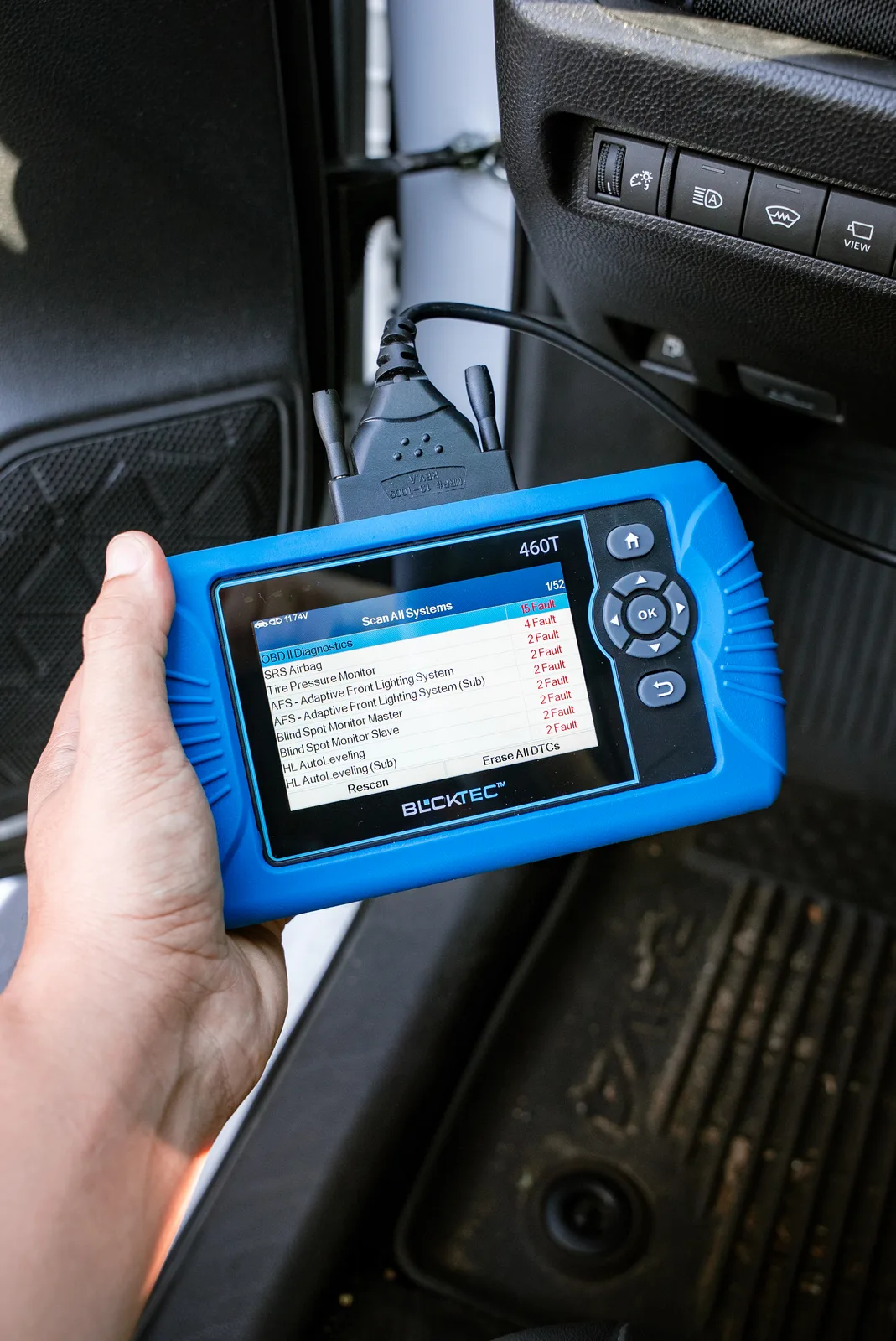
Step-by-Step: How to Diagnose Car Problems with Scanner
Step 1: Locate the OBD-II Port
Sit in your driver's seat and look under the steering wheel. You're looking for a connector that looks like a trapezoid with 16 pins inside. It's usually within a foot or two of the steering column.
Some cars hide it a little, so check the side panels or under the dash area. But it's always there. Once you find it, you're halfway done.
Step 2: Turn on the Ignition
This is important: turn your key to the ON position without starting the engine. The dashboard lights should come on, but the engine stays off. This powers up your car's computer system so the scanner can communicate with it.
Step 3: Plug In Your Scanner
Connect your OBD-II scanner directly into the port. It should slide in firmly. Wait a few seconds for the scanner to power up and connect to your vehicle's system. You'll see a screen come to life.
Step 4: Select Your Vehicle (If Needed)
Some scanners ask you to input your vehicle's year, make, and model. Just follow the prompts on the screen. This helps the scanner provide the most accurate code interpretation for your specific car.
Step 5: Read the Trouble Codes
Hit the menu option that says "Read Codes" or "Scan." The scanner will pull all diagnostic trouble codes (DTCs) from your car's computer. These are alphanumeric codes like P0301 or P0420 that point to specific problems.
Write down the codes. That's your diagnosis.
Step 6: Understand What the Codes Mean
Most scanners display what each code means in plain English. For example, P0420 means "Catalyst System Efficiency Below Threshold," which usually points to a faulty catalytic converter.
The scanner breaks it down so you understand what's actually wrong with your car. No cryptic mechanic jargon.
Related: Mechanic vs Scanner: When to DIY Diagnostics vs Call a Pro
What the Codes Tell You
Diagnostic trouble codes fall into a few categories. Some are minor and can wait. Others need immediate attention.
P-codes relate to the powertrain (engine, transmission, emissions). C-codes are about the chassis (brakes, suspension, steering). B-codes cover the body (windows, doors, lights). U-codes are for network communication problems.
Your scanner will show you which category each code belongs to. This helps you decide if you need a mechanic today or if you can safely drive your car to one tomorrow.
Going Deeper: Live Data and Freeze Frame
Basic code reading tells you the problem. But if you want to dig deeper, most scanners offer live data monitoring.
Live data shows you real-time readings from your car's sensors: engine temperature, oxygen sensor voltage, fuel pressure, and dozens of other measurements. You can watch these numbers change as you rev the engine or drive around.
This is where you become a real diagnostic detective.
Freeze frame data is a snapshot of your car's conditions at the exact moment the fault was detected. It shows you the engine speed, throttle position, fuel pressure, and other data from when the problem actually happened.
This information helps you (or a mechanic) understand the context of the failure. Sometimes a check engine light is a one-time fluke. Sometimes it points to a recurring problem that needs real repair.
Related: Check Engine Light Scanner: What It Does & How to Use One
Common Problems You Can Diagnose Yourself

Here are some codes you'll see often and what they usually mean:
- P0171 / P0174: System too lean. Usually a vacuum leak, dirty fuel injector, or bad mass airflow sensor.
- P0300: Random misfire. Could be bad spark plugs, coil packs, or fuel issues.
- P0455: Gross leak in the evaporative emission system. Often just a loose or bad gas cap.
- P0507: Idle air control system malfunction. Usually needs a mechanic, but not an emergency.
- P0740: Torque converter clutch malfunction. Transmission problem that needs a shop visit.
See the pattern? Some codes are quick fixes you can handle. Others need professional help. The scanner tells you which is which.
Clearing Codes (The Right Way)
Once you've read the codes and figured out your next move, you can clear them. Most scanners have a "Clear Codes" option in the menu.
Be careful here. Clearing codes just turns off the check engine light. It doesn't fix the problem. If the underlying issue isn't resolved, the light will come back on.
So only clear codes after you've made the repair, or after you've confirmed the problem was a one-time thing (like that loose gas cap).
Why Diagnosing Yourself Saves Real Money
A typical mechanic shop charges $75 to $150 just for the diagnostic scan. That's before they even start repairs.
With BLCKTEC, you can scan your car as many times as you want, forever, with no subscription fees. You own the scanner. The investment pays for itself on the first use.
Looking for an OBD2 Scanner?
Explore BLCKTEC →Plus, knowing the exact problem means you can shop around for repairs. You can call three different shops, tell them the code, and compare prices. You're no longer guessing or relying on a single mechanic's estimate.
Getting Support When You're Stuck
Sometimes a code comes back that you don't understand. Or you read the code and it makes sense, but you're not sure if you can fix it yourself.
That's when US-based customer support matters. BLCKTEC offers support from people who actually know cars, not a call center reading from a script. They can walk you through what a code means, what to expect for repairs, and whether you can DIY or need a pro.
You're not alone in figuring this out. Real people have your back.
Can You Do This Without a Scanner?

Technically, you could drive straight to a mechanic and let them diagnose. But that's expensive and puts you in a weak negotiating position.
You could also try reading the check engine light codes yourself by listening to the number of flashes on your dashboard. But that's slow, unreliable, and frustrating.
A scanner is the modern, sensible way. It's cheap insurance against getting ripped off and a tool that teaches you about your car.
What Happens Next After Diagnosis
Once you know what's wrong, you have three paths forward:
- DIY Repair: If it's something simple like spark plugs, a battery, or that gas cap, you can fix it yourself with basic tools and YouTube.
- Dealer or Trusted Mechanic: For more complex issues, book an appointment with a mechanic you trust. Now you know exactly what needs fixing, so you can hold them accountable.
- Sell As-Is or Trade: If it's a used car and the repair is expensive, you now have data to negotiate with a buyer or dealer.
The scanner gives you information. Information gives you power.
Tips to Get the Most Out of Your Scanner
Keep your scanner in your car at all times. Check engine lights don't announce themselves on a schedule. When it happens, you want the tool right there.
If a code comes back multiple times after you clear it, that's a red flag. The problem isn't solved. Don't ignore it.
Take photos of code numbers before clearing them. This way you have a record if you need to show a mechanic or track patterns over time.
Watch your live data occasionally, even when there's no check engine light. You get a feel for what "normal" looks like on your specific car. That makes spotting problems faster.
And remember: a scanner is a diagnostic tool, not a replacement for mechanical skill. It tells you what's wrong. Actually fixing it might require a shop. But at least you're not flying blind.
The Bottom Line
Learning how to diagnose car problems with a scanner is one of the smartest moves a car owner can make. You save money on diagnostic fees, you understand your vehicle better, and you prevent getting overcharged for repairs you didn't actually need.
Related: How to Diagnose Car Problems Yourself: The Smart DIYer's Guide
Related: What Is a Tune Up on a Car? Complete Guide
The barrier to entry is low. A decent scanner costs less than a single mechanic diagnostic visit. And you'll use it again and again throughout the life of your car, or even on friends' vehicles.
You don't need to be a mechanic to read a code. You just need the right tool and five minutes of your time. That's it.
Frequently Asked Questions
Can I use a scanner on any car?
OBD-II scanners work on virtually all cars manufactured after 1996 in the US, and most cars worldwide after that year. If your car has a check engine light and a dashboard, it has an OBD-II port. Older cars (pre-1996) require different diagnostic tools, but those are rare unless you're working on classic vehicles.
Will scanning my car void the warranty?
No. Reading diagnostic codes is a passive scan. You're just looking at data your car's computer has already generated. Clearing codes or making repairs might affect a warranty depending on the terms, but the scanning itself is completely safe and won't harm anything.
What if I scan my car and no codes come up?
That's actually common. Sometimes the check engine light triggers from an intermittent problem. The car fixed itself, but the light hasn't turned off yet. Scan a few times over a few days. If no codes appear, you can clear the light. If a code does show up, you've got your answer. You can also check your freeze frame data to see what conditions were present when the fault last occurred.
Do I need special training to use a scanner?
Not at all. A basic scanner has a menu system almost as simple as a phone. You plug it in, press a few buttons, and read the results. If you can text, you can operate a diagnostic scanner. The hardest part is understanding what the codes mean, but your scanner explains that for you in plain language.
Looking for an OBD2 Scanner?
Explore BLCKTEC →