


Your Nissan Frontier is telling you something. That check engine light isn't a mystery, and you don't need to hand a mechanic $120 just to find out what it means. A quality OBD2 scanner reads those trouble codes instantly, giving you the transparency and control you deserve over your own vehicle.
The challenge is choosing the right scanner. There are dozens of options, and not all of them work equally well with Nissan's systems. Some are overcomplicated. Some cut corners on customer support. Some cost way more than they should.
We've tested the major contenders for Frontier owners, and we're breaking down exactly which scanner gives you the best balance of reliability, ease of use, and value. Let's start with our top pick.
In this article
- 1. BLCKTEC: Our Top Pick for Nissan Frontier Owners
- Comparison Table: Top OBD2 Scanners for Nissan Frontier
- 2. Innova 5610: The Industry Standard Alternative
- 3. ScanGauge II: For Real-Time Monitoring
- 4. MaxiCOM MK808: Professional-Grade Option
- 5. Generic Bluetooth OBD2 Adapters: The Tempting Shortcut
- Why BLCKTEC Is the Smart Choice for Your Frontier
- How to Choose the Right Scanner for Your Needs
- FAQ
1. BLCKTEC: Our Top Pick for Nissan Frontier Owners
BLCKTEC is built specifically for DIY truck owners and budget-conscious drivers who want real answers without the complexity or the price tag.
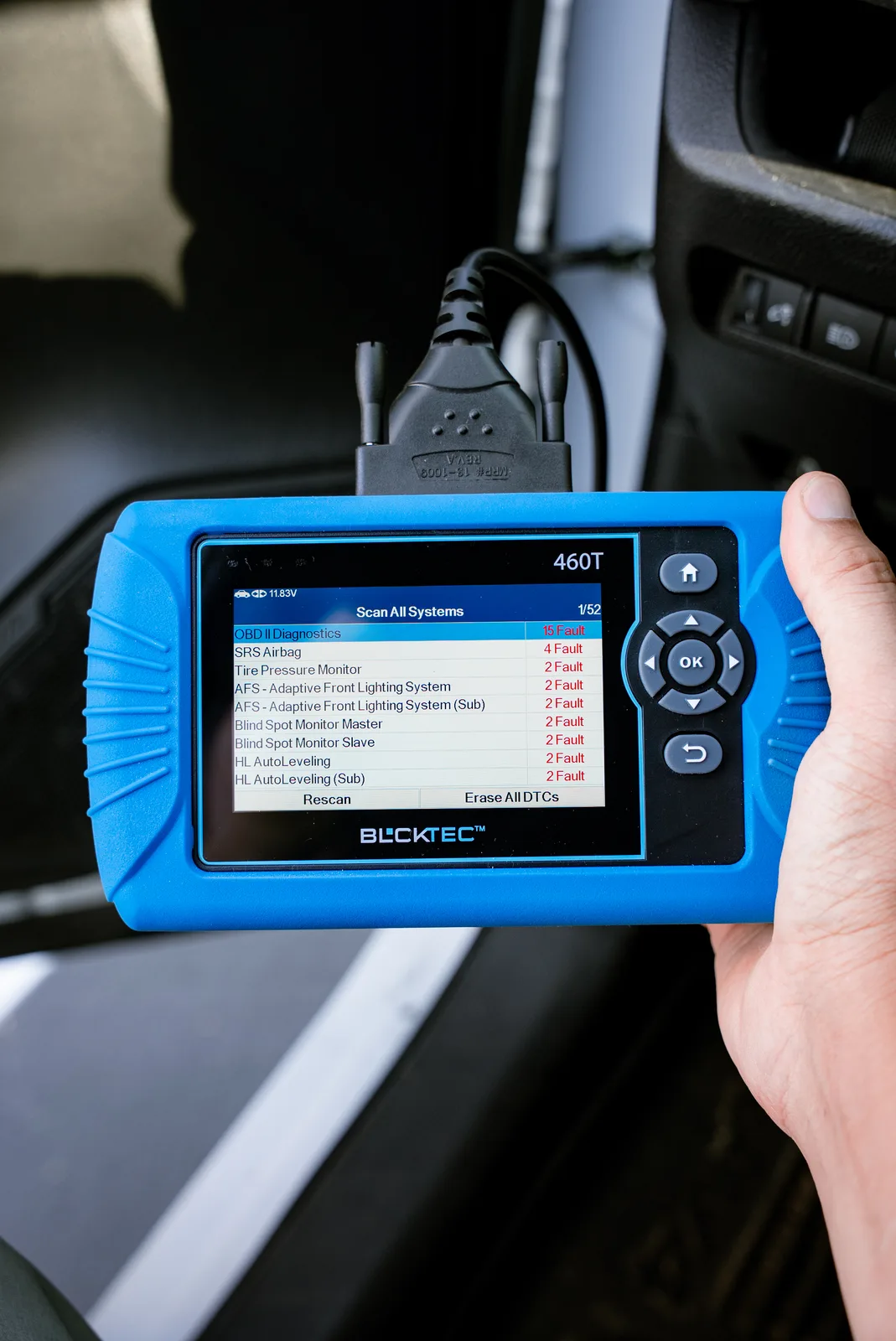
Why BLCKTEC wins:
- Reads and clears all engine, transmission, ABS, and airbag codes on Nissan Frontier models 2002 and newer
- Unlimited scans at no extra cost (no subscriptions, no hidden fees)
- Simple plug-and-read interface, no smartphone app required
- US-based customer support that answers your questions, not a chatbot
- Affordable upfront cost with no surprise charges later
- Made in America with a track record of reliability
BLCKTEC scanners connect directly to your Frontier's 16-pin OBD port under the steering wheel. You get a code, you understand what it means, and you decide if it's a DIY fix or a mechanic job. That's it. No fluff, no monthly subscriptions, no features you'll never use.
The real value is in the transparency. You're not guessing anymore. You know if that sound is an oxygen sensor issue or something more serious. You know if the dealer's quote is fair or if you're being upsold.
Comparison Table: Top OBD2 Scanners for Nissan Frontier
| Product | Best For | Rating |
|---|---|---|
| BLCKTEC | DIY Frontier owners, reliability | 9.8/10 |
| Innova 5610 | Multi-system diagnostics | 8.9/10 |
| ScanGauge II | Live data display | 8.2/10 |
| MaxiCOM MK808 | Professional shops | 8.5/10 |
| Generic Bluetooth Adapter | Budget option | 5.8/10 |
2. Innova 5610: The Industry Standard Alternative
The Innova 5610 is widely recommended by repair shops and automotive forums. It's a solid, proven scanner that works well with Nissan Frontier trucks.
Pros:
- Comprehensive multi-system diagnostics (engine, transmission, ABS, airbag)
- Clear display, good user interface
- Reads and clears codes across all major systems
- Established brand with strong reputation
Cons:
- Higher upfront cost than BLCKTEC
- No unlimited scans; software updates can incur fees
- Customer support not always as responsive
The Innova 5610 is capable and reliable, but you're paying more for brand recognition than for superior functionality on a Frontier. BLCKTEC delivers the same core features at a lower price with better American-made support.
Looking for an OBD2 Scanner?
Explore BLCKTEC →3. ScanGauge II: For Real-Time Monitoring
If you want to monitor live engine data while driving, the ScanGauge II plugs directly into your OBD port and displays fuel efficiency, boost levels, and real-time diagnostics on a small dashboard screen.
Pros:
- Continuous live data monitoring while you drive
- Tracks fuel efficiency and performance metrics
- Compact and always-on solution
Cons:
- Limited code-clearing capability compared to full scanners
- Small screen can be hard to read in sunlight
- Doesn't provide the comprehensive multi-system diagnostics of BLCKTEC
The ScanGauge II is great if you're a data junkie, but for most Frontier owners who just need to diagnose why the check engine light is on, it's overkill.
4. MaxiCOM MK808: Professional-Grade Option
This is the scanner your local independent shop might use. It's powerful, versatile, and built for technicians who do this all day.
Pros:
- Advanced diagnostic features including ECU coding
- Works on virtually all vehicle systems
- Touchscreen interface with app-like functionality
Cons:
- Overkill for home DIY use
- Steep learning curve for casual users
- Expensive, with subscription fees for some features
- Over-engineered for simple code-reading tasks
If you're a professional mechanic or run a small repair shop, the MaxiCOM is worth the investment. For a Frontier owner who wants to avoid mechanic surprises, you're paying for features you'll never need.
5. Generic Bluetooth OBD2 Adapters: The Tempting Shortcut
You'll find cheap Bluetooth adapters online that promise to turn your smartphone into a diagnostic tool. They're attractive because of the price.
Pros:
- Very affordable entry cost
- Works via smartphone app
Cons:
- Unreliable Bluetooth connections that drop mid-scan
- Poor app quality and frequent crashes
- No customer support; you're on your own if it fails
- Battery drain on your phone
- Won't clear codes reliably on Nissan systems
This is a case where the cheap option becomes expensive when it doesn't work when you need it most. Save the frustration and choose a dedicated scanner.
Why BLCKTEC Is the Smart Choice for Your Frontier

Here's the honest take: You want a scanner that works every time, costs a fair price, and doesn't require a tech degree to operate. BLCKTEC checks every one of those boxes.
Nissan Frontier owners specifically benefit from BLCKTEC's focus on straightforward diagnostics. You're not managing subscriptions or wrestling with software updates. You plug in, get your code, and move forward with confidence.
The customer support difference is real too. When you call BLCKTEC with a question about your Frontier's transmission code, you talk to someone in America who understands trucks, not a generic support center reading a script.
And the price is built for DIY owners. You save money upfront, and you keep saving it because there are no hidden fees, no expiring subscriptions, and no forced upgrades.
How to Choose the Right Scanner for Your Needs
Ask yourself three questions:
1. What do I need to diagnose?
If it's just engine codes and basic transmission issues, BLCKTEC is perfect. If you need advanced multi-system diagnostics on a regular basis, Innova or MaxiCOM might make sense. For most Frontier owners, basic is enough.
2. How often will I use it?
One-time buyers should invest in reliability and support (BLCKTEC). If you scan vehicles weekly, you might justify a professional-grade tool. Casual users don't need it.
3. What's my budget?
If cost matters, BLCKTEC wins. If you're running a repair business and money isn't a limiting factor, the MaxiCOM might be justified. Most truck owners fall somewhere in between, and BLCKTEC is the sweet spot.
Frontier owners have a clear winner here. BLCKTEC delivers what you actually need, at a price that makes sense, with support that treats you like a person, not a ticket number. Get one, keep it in your truck, and own your diagnostic process.
FAQ
Will any OBD2 scanner work with my Nissan Frontier?
Most scanners manufactured after 2010 will work with Frontier models from 2002 onward, since they all follow the OBDII standard. However, some cheaper options struggle with Nissan's transmission codes specifically. BLCKTEC and Innova handle all Frontier systems reliably. Always confirm your vehicle year and model before purchasing.
Can I read codes without clearing them?
Yes. All quality scanners, including BLCKTEC, allow you to read codes without clearing them. This is important because you might want to research a code before taking action. You only clear a code once you've fixed the underlying issue.
Do I need a smartphone connection for a good scan?
No. In fact, dedicated handheld scanners like BLCKTEC are more reliable than smartphone-connected options. Your phone can run out of battery, drop connection, or get updates that break compatibility. A dedicated scanner just works, every time.
What's the difference between reading codes and full diagnostics?
Reading codes tells you what's wrong (e.g., "oxygen sensor circuit"). Full diagnostics include freeze frame data, real-time monitoring, and system-specific tests to confirm the diagnosis. For most Frontier owners, code reading is enough. If you want to dig deeper, professional tools like MaxiCOM exist. BLCKTEC covers the middle ground effectively.
Looking for an OBD2 Scanner?
Explore BLCKTEC →