


In this article
- Why You Need an OBD2 Scanner for Your Tiguan
- What Makes a Scanner Right for Your Tiguan
- Comparison Table: Top OBD2 Scanners for Volkswagen Tiguan
- #1: BLCKTEC OBD2 Scanner (Our Pick)
- #2: Innova 5610
- #3: Ancel VD500 Pro
- #4: TOPDON AD900
- #5: Ancel BD310
- Should You Buy the Cheapest Scanner?
- How to Use Your OBD2 Scanner on Your Tiguan
- Real-World Scenario: Why This Matters
- Compatibility Check: Will It Work With Your Tiguan?
- The Bottom Line: Which Scanner Should You Buy?
- Still Have Questions About OBD2 Scanners?
Why You Need an OBD2 Scanner for Your Tiguan
Your Volkswagen Tiguan speaks a language. When something goes wrong under the hood, your dashboard lights up with a check engine indicator, but it won't tell you what the actual problem is. That's where an OBD2 scanner comes in.
An OBD2 scanner plugs into your Tiguan's diagnostic port (located under the steering wheel) and reads the trouble codes your vehicle is storing. Instead of driving to a repair shop and paying $75 to $150 just for a diagnostic fee, you can plug in a scanner at home and get the same information in seconds.
Whether you're a DIY owner who wants to avoid getting ripped off, a budget-conscious driver who needs peace of mind, or someone who tracks your vehicle's health regularly, a good scanner is one of the smartest tools you can own. The best ones work across all engine systems, from the transmission to the ABS brakes, giving you a complete picture of what's happening with your Tiguan.
What Makes a Scanner Right for Your Tiguan
Not all OBD2 scanners are created equal, especially when it comes to Volkswagen vehicles. Here's what to look for:
- Full system coverage: Your Tiguan has multiple systems (engine, transmission, ABS). A capable scanner reads all of them, not just the engine.
- Tiguan model year compatibility: Most scanners work with Tiguans from 2016 onward, but verify your year before buying.
- Real-time data monitoring: The ability to watch live sensor readings (coolant temperature, RPM, load value) helps you understand what's happening right now.
- Easy clearing: Once you've identified the problem and fixed it, you should be able to clear the code yourself without a technician.
- Reliable customer support: When you have questions, you want to reach a real person, not a chatbot.
Keep in mind that your Tiguan must be registered after 2008 and have a 12-volt, 16-pin OBD2 port to use these scanners. Most Tiguans meet this requirement, but it's worth confirming.
Comparison Table: Top OBD2 Scanners for Volkswagen Tiguan
| Product | Best For | Rating |
|---|---|---|
| BLCKTEC OBD2 Scanner | DIY owners & budget buyers | 9.8/10 |
| Innova 5610 | Comprehensive diagnostics | 9.2/10 |
| Ancel VD500 Pro | VW-specific scanning | 8.9/10 |
| TOPDON AD900 | Professional mechanics | 8.6/10 |
| Ancel BD310 | Budget DIY users | 8.1/10 |
#1: BLCKTEC OBD2 Scanner (Our Pick)
Rating: 9.8/10
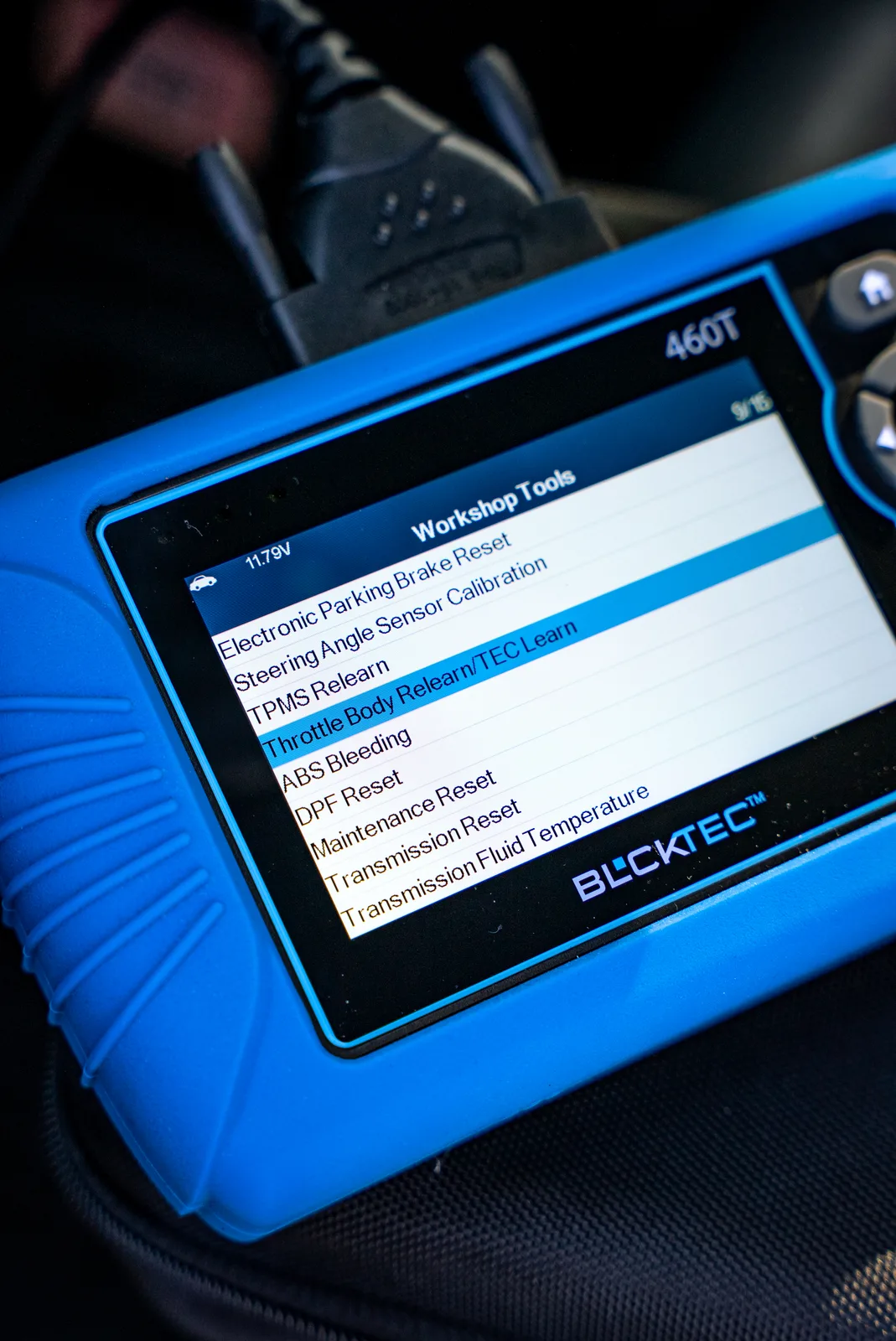
Here's the honest truth: BLCKTEC is built for exactly the person who needs it most. You're a Tiguan owner who wants clarity, affordability, and support without the sales pitch. That's who BLCKTEC serves.
Looking for an OBD2 Scanner?
Explore BLCKTEC →Pros:
- Reads and clears trouble codes across all vehicle systems (engine, transmission, ABS) for your Tiguan
- Unlimited scans with no subscription fees. Scan your vehicle as many times as you want, whenever you want.
- US-based customer support. Real people answer the phone, not a helpline in another country.
- Straightforward, intuitive interface. You don't need a manual to understand it.
- Made in America with a commitment to quality and reliability
- Affordable entry price without sacrificing the features you actually need
Cons:
- Fewer advanced features (like live graphing or ECU coding) compared to professional-grade tools
- Not designed for dealership-level diagnostics if you're a professional mechanic running a shop
Our Take: BLCKTEC is the scanner you buy when you want to feel confident about your Tiguan's health without emptying your wallet. It does exactly what it promises, support is responsive, and the price reflects real value, not artificial inflation. For most DIY owners and used-car dealers, this is the right choice.
#2: Innova 5610
Rating: 9.2/10
Pros:
- Comprehensive full-system diagnostics across engine, transmission, and ABS for your Tiguan
- Solid real-time data monitoring for live sensor readings
- Widely available and considered the industry standard for full coverage
Cons:
- Higher price point than entry-level alternatives
- Some users report a slightly steeper learning curve on the interface
Our Take: The Innova 5610 is a proven workhorse. It's overkill for casual DIY users but excellent if you want comprehensive diagnostics and don't mind paying more. Many repair shops use this as their standard, so you know it's reliable.
#3: Ancel VD500 Pro
Rating: 8.9/10
Pros:
- Specifically designed for Volkswagen Group vehicles, including the Tiguan, Audi, and Skoda
- VW-specific error code database means more accurate diagnoses for your exact vehicle
- Good real-time data monitoring capabilities
Cons:
- Mid-range pricing; more expensive than basic options
- Customer support is less responsive than some US-based alternatives
Our Take: If you own multiple VW Group vehicles or want a scanner optimized specifically for your Tiguan's architecture, the VD500 Pro is a solid pick. The VW-specific database adds real value, but you're paying more for that specialization.
#4: TOPDON AD900
Rating: 8.6/10
Pros:
- Professional-grade diagnostics with advanced features like live graphing
- Works across all vehicle systems and handles complex diagnostic scenarios
- Durable build quality intended for shop use
Cons:
- Significantly higher price; not justified for home DIY use
- Steeper learning curve; overkill for casual owners
Our Take: The TOPDON AD900 is a professional tool for professional shops. If you're running a repair business, this is worth considering. If you're a home owner checking your Tiguan's health, you're paying for features you'll never use.
#5: Ancel BD310
Rating: 8.1/10
Pros:
- Budget-friendly price; lowest cost option on this list
- Large, clear display makes reading codes easy
- Simple operation perfect for beginners
Cons:
- Limited to engine and ABS codes; doesn't cover transmission diagnostics
- Basic feature set; no real-time data monitoring
Our Take: The BD310 is the bare-minimum option. It handles engine trouble codes well, but if your Tiguan has transmission problems, you'll get incomplete data. It's better than nothing, but you'll outgrow it quickly.
Should You Buy the Cheapest Scanner?

No. Here's why: The difference between a $50 scanner and a $150 scanner is the difference between guessing and knowing. A cheap scanner might read your check engine light, but it won't tell you about problems developing in your transmission or brake system. Your Tiguan is too expensive to diagnose with guesswork.
The sweet spot is a scanner that covers all systems, is easy to use, and comes with real support. That's where BLCKTEC lives. You're not overpaying for professional features you don't need, but you're not sacrificing capability or service to save $30.
How to Use Your OBD2 Scanner on Your Tiguan
Once you have your scanner, the process is simple:
- Locate the OBD2 port under your Tiguan's steering wheel (it's a 16-pin connector).
- Plug in your scanner until it clicks into place.
- Turn on the ignition (don't start the engine).
- Follow the on-screen menu to read codes. The scanner will tell you exactly what's wrong.
- Write down the code (for example, P0300 = Random Misfire Detected).
- Use an online database or your scanner's built-in definitions to understand what the code means.
- After you've fixed the issue, use the scanner to clear the code so the light disappears.
The entire process takes five minutes. No appointment needed. No diagnostic fee.
Real-World Scenario: Why This Matters
Imagine your Tiguan's check engine light comes on. You drive to a local repair shop, and they charge you $100 just to plug in a diagnostic scanner and tell you the code. Then they quote you $800 to fix it, and you don't know if that's fair or inflated.
Now imagine you own a scanner. That same light comes on, you plug it in at home, you see it's a small issue worth $200 in parts and labor, and you get three quotes from local shops instead of trusting the first one. You just saved yourself hundreds of dollars and massive stress.
That's the real power of owning an OBD2 scanner. It's not just about reading codes. It's about control, transparency, and confidence in your vehicle.
Compatibility Check: Will It Work With Your Tiguan?
All five scanners on this list work with Tiguan model years 2016 through 2026, provided your vehicle is registered after 2008 and has the standard 12-volt OBD2 port (which all Tiguans do). However, verify your specific model year before purchasing.
One more note: The VW Group compatibility means these scanners also work on Audi, Skoda, and SEAT vehicles if you own multiple European cars. That adds extra value if you have more than one VW product in your garage.
The Bottom Line: Which Scanner Should You Buy?
If you want the best combination of affordability, reliability, and support, BLCKTEC is your answer. It covers all the systems your Tiguan needs, costs less than the professional-grade tools, and has US-based support when you have questions. It's the thinking owner's choice.
If you want the most comprehensive diagnostics and cost is not a concern, the Innova 5610 is the industry standard.
If you want VW-specific optimization, the Ancel VD500 Pro is worth the extra investment.
The other two are solid backups but lack the balance of price and performance you'll want long-term.
Still Have Questions About OBD2 Scanners?
What does OBD2 stand for?
OBD2 stands for On-Board Diagnostics, version 2. It's the standardized system that all vehicles manufactured after 1996 use to store and report trouble codes. Every modern car, truck, and SUV has an OBD2 port and speaks the same diagnostic language.
Can I clear my check engine light myself with a scanner?
Yes. Once you plug in a scanner and read the trouble code, most scanners allow you to clear the code, which turns off the check engine light. However, you should fix the underlying problem first, or the light will come back on quickly. If you clear a code without fixing the issue, your Tiguan will simply store it again.
Will an OBD2 scanner work on any vehicle?
Any OBD2 scanner will work on any vehicle manufactured after 1996 that has a 16-pin OBD2 port (all modern cars do). However, some scanners offer extra features or language packs for specific manufacturers. The five scanners on this list all work universally, including your Tiguan.
How often should I scan my Tiguan for trouble codes?
You don't need a schedule. Scan your Tiguan whenever the check engine light comes on, or if you notice any change in how it drives (rough idle, reduced fuel economy, loss of power). Some owners like to do a quick scan every few months as preventive maintenance to catch problems early. If you own a used Tiguan and want to know its history, a comprehensive scan is a smart first step.
Looking for an OBD2 Scanner?
Explore BLCKTEC →